
How to Register Your Business on ChatGPT (2026 Guide + Tips)
Posted on: November 12, 2026
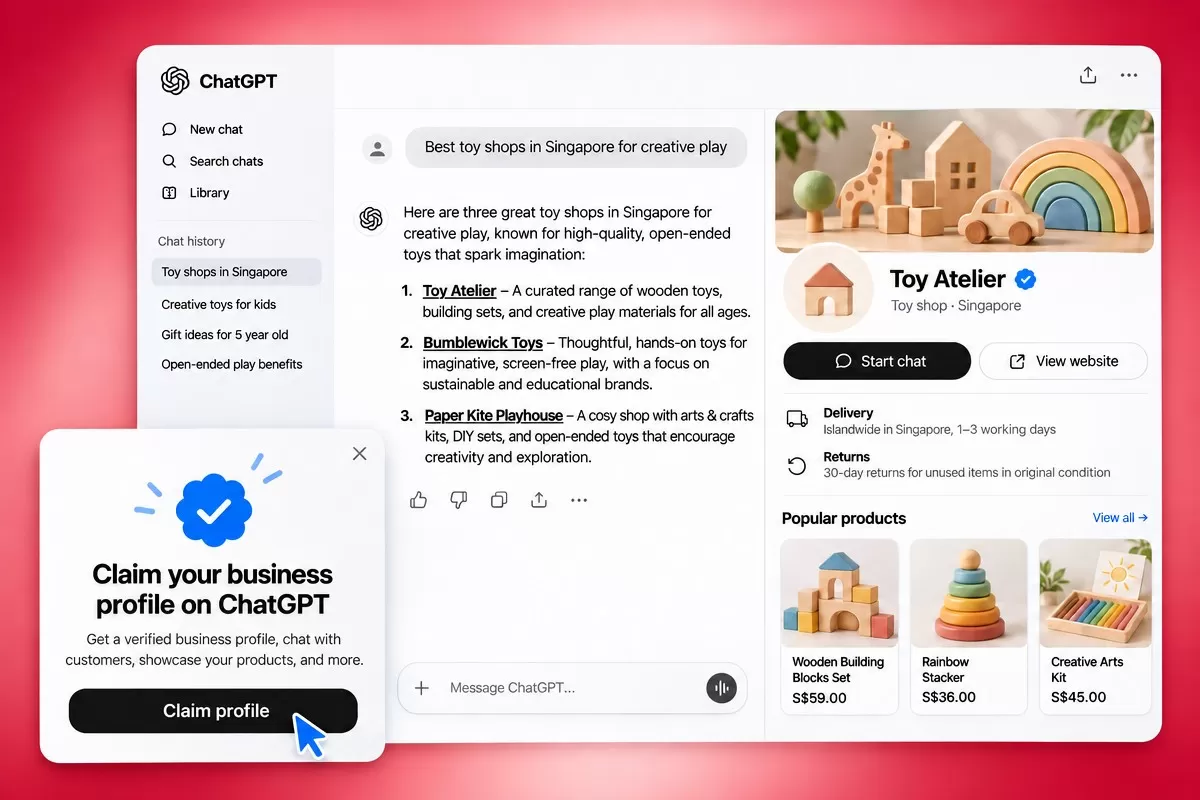
For years, the first rule of being found online was simple: claim your Google Business Profile. As of 10 November 2026, there is a second one. OpenAI has launched Businesses in ChatGPT in beta, letting companies claim a verified profile inside ChatGPT, keep their details accurate, and see how often ChatGPT mentions them.
With OpenAI citing 1.2 billion weekly ChatGPT users, this is the clearest signal yet that AI search is becoming a discovery channel in its own right. Here is what launched, who can use it, how to register, and what it means for your marketing.
What OpenAI launched
Businesses in ChatGPT have two parts, both managed from a new dashboard called Business Hub. When your business appears in a ChatGPT answer, people can click through to see your ChatGPT profile.
1. A claimed business profile. Once verified, you can update your website, business description, category, logo, delivery and return policies, and add a cover photo. Retailers can also connect a product feed (a CSV upload or Shopify) to share prices and availability. Profiles show up beside ChatGPT’s answers with your details, product cards, and buttons to start a chat or visit your website. After your identity check is approved, your profile gets a blue verified checkmark.
2. Business Agents. A branded AI assistant that answers customer questions about your products and policies, using information and instructions you provide. For example, a shopper comparing two products can ask which one fits their needs. These chats are clearly labelled and kept separate from ChatGPT’s own answers. Agents can’t take payments, make bookings or check orders yet; they explain and link customers to your website. Businesses can also sponsor their agent as the destination for ChatGPT Ads, shown as clearly labelled sponsored placements. For now, agents are limited to eligible US e-commerce and online service businesses.
Business Hub also gives you aggregated insights over 7 and 28 days:
| Metric | What it tells you |
| Mentions | How often ChatGPT references you. For online brands, ChatGPT must reference your website; your brand name alone doesn’t count. For local businesses, showing your location in a result counts. |
| Profile views | How often people open your business profile |
| Website clicks | Clicks from ChatGPT to your site (these don’t confirm visits or conversions) |
| Discovery topics | Common themes in ChatGPT answers that mentioned or cited you, without revealing individual prompts |
Businesses never see individual prompts or customer conversations, including chats with their agent. Claiming a profile and publishing an agent are free at launch, though OpenAI has left the door open to charging later. Claiming, agents and advertising are separate, and you don’t need to run ads to claim your business.
Why it matters for your brand
Customers increasingly ask ChatGPT, not a search bar, “Which agency should I hire?” or “Where can I buy this near me?” Until now, brands had no official way to see or influence what ChatGPT said about them. Business Hub changes three things.
- Accuracy. You can correct outdated details, prices and policies at the source, instead of hoping ChatGPT finds the right page.
- Visibility you can measure. For the first time, you can see how often ChatGPT mentions you and how many people click through. Early numbers vary widely: one business reported 690 mentions and 24 clicks over 28 days, about a 3.5% click rate.
- A new conversion point. Business Agents let customers ask detailed questions inside ChatGPT, and they can also be used as the landing destination for paid ChatGPT Ads.
One caveat matters: OpenAI says ChatGPT will keep making independent recommendations, and claiming a profile carries no guarantee of better placement. Registering is the foundation, not the whole strategy.
How to register your business on ChatGPT
- Open Business Hub. Sign in to ChatGPT with the account you’ll use to manage the business, then open the Business Hub from the sidebar or go to chatgpt.com/business-hub.
- Find your business. Search by name and select the matching listing. If you run an eligible online business and can’t find it, you may see an option to add it.
- Confirm your admin account. This ChatGPT account will own the profile and can invite teammates later.
- Verify your claim. Choose one of the methods offered:
- Business phone: get a code by SMS or automated call.
- Business email: get a code at the email linked to your business.
- Website domain: add a TXT record to your DNS settings, then select Verify domain. Ask your web team or agency if someone else manages your domain.
- Shopify: connect and log in to your Shopify store.
- Wait for claim approval. OpenAI reviews your claim and emails you its decision or a request for more information.
- Complete identity verification with Persona. You’ll need a government-issued ID, business registration details (such as your UEN in Singapore) and proof you’re authorised to represent the business. Make sure your business name and address match your official records.
- Update your profile. Once Persona approves you, add your description, logo, policies and cover photo, and connect a product feed if you sell products. OpenAI reviews changes before they go live.
- Set up an agent (optional, US only for now). Review the information it uses, test it with common customer questions, then select Publish.
Good to know before you claim
- Your agency can help. The admin who claimed the business can add teammates and give an agency access to manage the profile or agent. Each person uses their own ChatGPT account, so never forward your claim invitation.
- Already an OpenAI advertiser or Enterprise customer? You can work directly with your OpenAI representative to claim your business.
- On Shopify? You can connect your store from Business Hub or the Shopify admin to speed up verification.
- Each brand is separate. Claiming your main brand doesn’t claim its locations, and there’s no central dashboard for multiple brands yet.
- Someone else claimed you? Open the profile, select the more options menu (•••), then Dispute ownership.
- Published profiles stay published. Only unpublished drafts can be deleted, so check your details before Persona approval publishes a new profile.
- Changes aren’t instant. Updates are reviewed and can take time to show in answers, and ChatGPT may still use other sources about your business.
A note for Singapore businesses: You can claim a business wherever ChatGPT is available and verification is supported, but availability depends on your location and business type. Local stores and restaurants can currently claim only an existing US listing, and Business Agents are US-only. OpenAI says it plans to expand to more markets and business categories over time. Online businesses have the best chance of claiming early, so it’s worth trying now. For the latest requirements, see OpenAI’s guide to setting up your business on ChatGPT.
Beyond registration: how to get recommended by ChatGPT
A claimed profile tells ChatGPT who you are. Whether it recommends you still depends on what the rest of the web says. This is where generative engine optimisation (GEO) comes in.
- Keep your facts consistent everywhere. Your name, address, services and prices should match across your website, Google Business Profile, directories and social pages.
- Answer real customer questions. Write clear, specific pages that answer what people actually ask, such as pricing, comparisons and how-to guides. A strong content marketing plan makes this repeatable.
- Earn third-party mentions. Reviews, press coverage, industry listings and partner pages give ChatGPT independent reasons to cite you.
- Make your site easy to read for AI. Use clean structure, descriptive headings and structured data, and don’t block AI crawlers you want to be found by. Good SEO and a well-built website do most of this work.
- Use your new data. Check Business Hub’s discovery topics to see which conversations you appear in, then create content for the topics where you are missing.
The bottom line
Businesses in ChatGPT are still in beta, but the direction is clear: AI assistants are becoming a place where customers find, compare and choose brands. Claim your profile now, keep it accurate, and start building the kind of online presence ChatGPT wants to recommend.
Need help getting found in AI search? Impossible Marketing helps brands claim their ChatGPT profile, audit how AI assistants talk about them, and build a GEO and AI SEO strategy that turns mentions into customers. Get in touch with our team to get started.