
Google Search Console Now Tracks Your AI SEO Visibility
Posted on: June 19, 2026
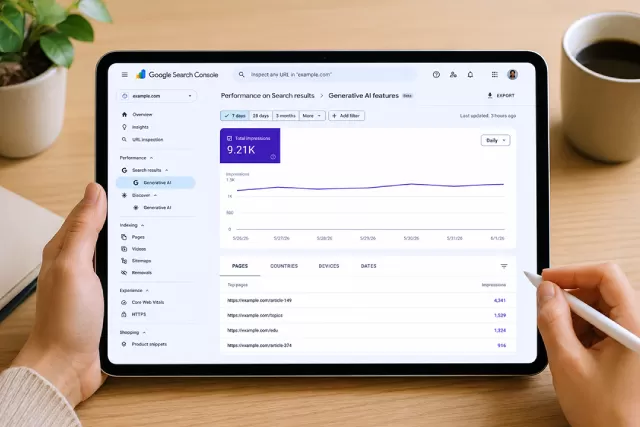
For anyone investing time in AI SEO, there has always been a frustrating blind spot. You could optimise your content for AI Overviews, refine your structured data, build entity signals across the web, but you couldn’t actually see whether any of it was working inside Google’s own tools. That blind spot has a real cost. And until now, most brands had no way to measure it.
That gap just closed.
Google has launched Generative AI performance reports in Search Console. For the first time, you can see how often your site is appearing inside AI Overviews and AI Mode, directly from the platform you’re already using.
It’s a significant moment. Not just because the data now exists, but because of what it measures, and what it deliberately leaves out.
What the New Reports Actually Show
The reports are split across two surfaces: Search and Discover.
The Search report covers impressions from AI Overviews and AI Mode — Google’s two main generative AI features in search. The Discover report covers AI Overviews appearing inside Google Discover. Both are now visible in Search Console, though Google is rolling access out to a subset of website owners first before making them widely available.
Within each report, you can break down impressions by pages (which URLs are appearing in AI features), countries (where those impressions are coming from), devices (desktop, tablet, or mobile), and dates (with hourly, daily, weekly, or monthly granularity).
That’s a meaningful set of dimensions. If your site is appearing heavily in AI Overviews for mobile users but barely showing up for desktop searches, you now have the data to see that and to ask why.
The Metric That’s Missing
Here’s the detail worth paying close attention to: the reports show impressions only. There are no clicks.
That’s not an oversight. It reflects something real about how AI features work.
In traditional search, a click is the clearest signal of success. Your result appeared, a user found it relevant, they visited. In AI Overviews and AI Mode, the dynamic is different. Gemini synthesises an answer from multiple sources, cites your content inline, and the user may or may not click through to your site. The answer was the destination.
Without click data, you can’t yet calculate an AI impression-to-visit rate the way you would with a standard search result. What you can do is track whether your impressions are growing or shrinking over time, and which pages are earning or losing visibility in AI features.
That’s a different kind of insight, but a useful one. A page with rising AI impressions and flat organic traffic is worth investigating. A page with strong organic rankings but zero AI impressions is a signal that your content isn’t structured in a way AI is finding useful, even if Google’s traditional crawler rates it highly.
The Opt-Out Toggle: Think Before You Touch It
Alongside the new reports, Google is introducing a toggle that lets you block your site’s content from appearing in generative AI features entirely. It’s worth thinking this through carefully before touching it.
The case for opting out: if you’re a publisher whose revenue depends on direct traffic, and AI Overviews are absorbing clicks that would otherwise land on your site, removing yourself from AI features might feel like the logical move.
The case against: sites that opt out receive zero impressions from AI Overviews and AI Mode. Zero visibility in a part of search that Google is actively expanding. As these features grow, opting out means ceding ground to competitors who stayed in, and that ground will be harder to reclaim later.
There’s no universal right answer. But it’s a decision worth making deliberately, with data, not as a reaction to the idea of AI using your content.
How to Actually Use This Data
If you have access to the reports, here’s how to make them useful rather than just interesting.
Establish a baseline first. The first thing this data gives you is a snapshot of where you stand right now: which pages are getting AI impressions, in which countries, on which devices. That baseline is what all future progress is measured against.
Look for the gaps between organic and AI performance. Pages that rank well in organic search but have low AI impressions may need better structure: clearer headings, more direct answers, stronger entity signals. Pages with high AI impressions but weaker organic rankings suggest your content is trusted by AI but not yet performing in traditional results — a different problem with a different fix.
Cross-reference with your standard performance report. If AI impressions are high but you’re not seeing a corresponding lift in organic traffic, that tells you something real about how users are consuming your content inside AI features without clicking through. That insight should inform how you think about content length, structure, and the value of being cited versus visited. It’s the AI vs human marketing question, made measurable.
Watch the trend, not just the snapshot. A single data point tells you very little. A trend across weeks or months tells you whether your AI SEO efforts are compounding over time, or whether something changed.
What This Signals for AI SEO
The launch of Generative AI performance reports in Search Console is not a minor product update. It’s a signal that AI search is no longer an experimental feature being quietly tested in the background. Google is building reporting infrastructure around it, and that means it’s here to stay.
For anyone working on AI SEO, this data is the missing piece that makes the work measurable. Until now, you were optimising without a scoreboard. That’s changed.
The question now isn’t whether to care about your AI impressions. It’s whether your current strategy is building them, and whether you’ll be able to tell the difference when it is.